
In brief
Two pages show the citations behind your AI answers. Top Citation Sources ranks the domains AI engines cite most for your prompts. Your URLs in AI Citations lists every time an answer cited a page on your own website, with the prompt and engine.
Key points
- Both pages cover the last 90 days.
- Open Top Citation Sources with View all on the GEO Monitor Dashboard.
- Open your URL citations from the link on the Citation Rate card.
- Your own domain is highlighted in the brand colour.
- Click a prompt under a cited URL to open that answer on the Runs tab.
- Your URL list needs a website address set in Settings, Workspace.
The steps at a glance
- 1
Open the dashboard
Go to GEO Monitor in the sidebar. The Dashboard tab opens first.
- 2
Open the top domains
On the Top Citation Sources card, press View all to see up to 50 domains.
- 3
Open your own cited pages
On the Citation Rate card, press the Your URL cited link to see every citation of your pages.
- 4
Check the answer
Click the prompt under any of your cited URLs to open that answer on the Runs tab.
- 5
Go back
Press Back to overview to return to the dashboard.
These two pages answer two simple questions. Which websites do AI engines rely on when they answer your prompts? And how often do they cite your own pages?
Neither page has its own tab. You reach both from the GEO Monitor Dashboard.
How to open them
- Go to GEO Monitor in the sidebar. The Dashboard tab opens first.
- Find the Top Citation Sources card and press View all. This opens the full list of cited domains.
- Find the Citation Rate card. When at least one of your pages has been cited, it shows a link starting "Your URL cited", followed by the number of citations. Press it to open your own cited pages.
- On either page, press Back to overview to return to the dashboard.
Top Citation Sources
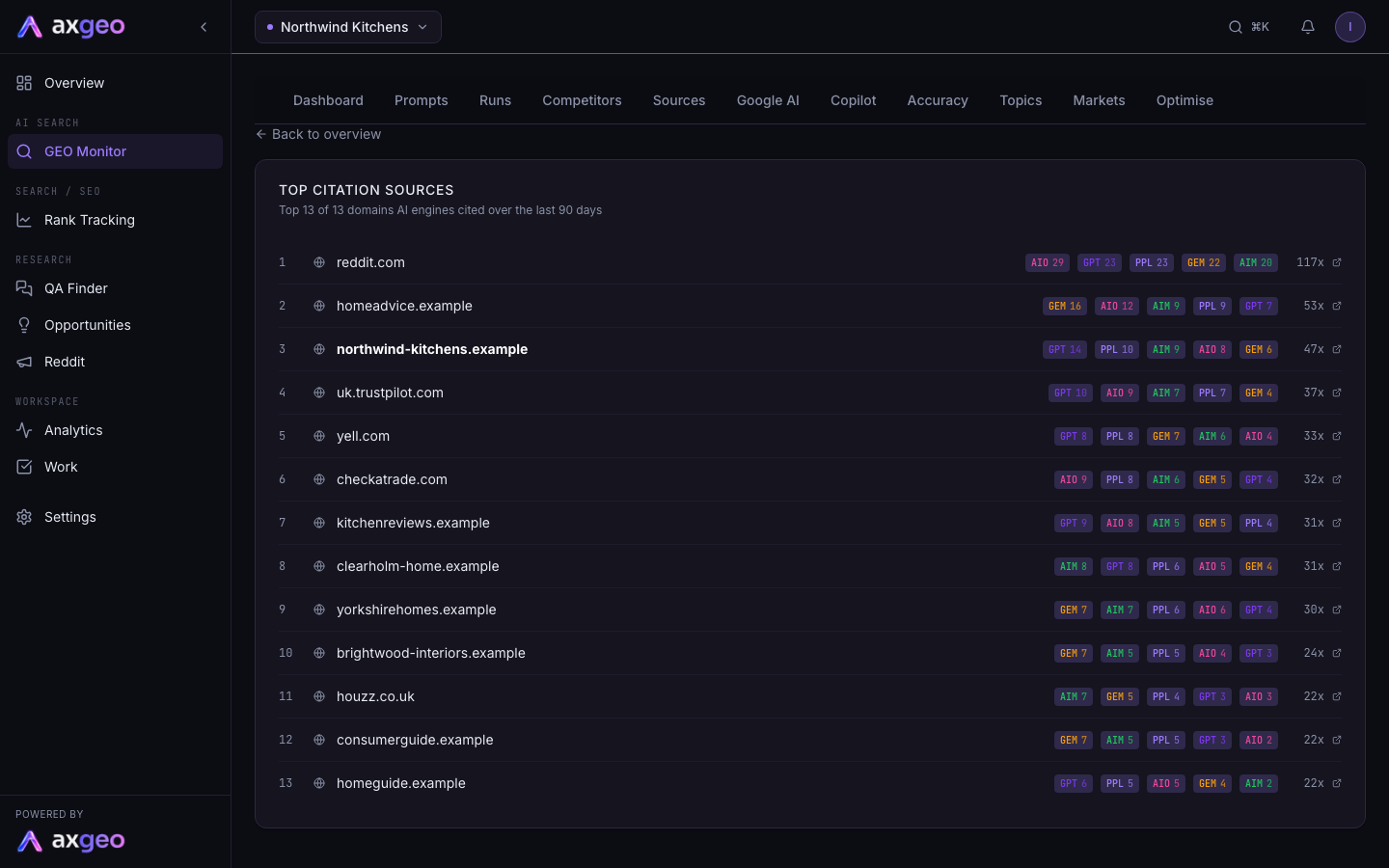
This page ranks the domains AI engines cited in answers to your prompts over the last 90 days. It shows up to 50 domains, and the line under the heading tells you how many domains were cited in total.
For each domain you see:
- its rank in the list
- a small code for each engine that cited it, with that engine's count
- the total number of citations, shown as a number followed by x
- a link to open the domain in a new tab
Hover over an engine code to see the engine's full name and its count. Your own domain is highlighted in the brand colour, so you can spot it in the ranking.
Only the latest answer from each engine for each prompt is counted. If a prompt runs twice in the window, the citations are not doubled. If you track prompts in more than one market, each market's answer counts on its own. See Markets.
Your URLs in AI Citations
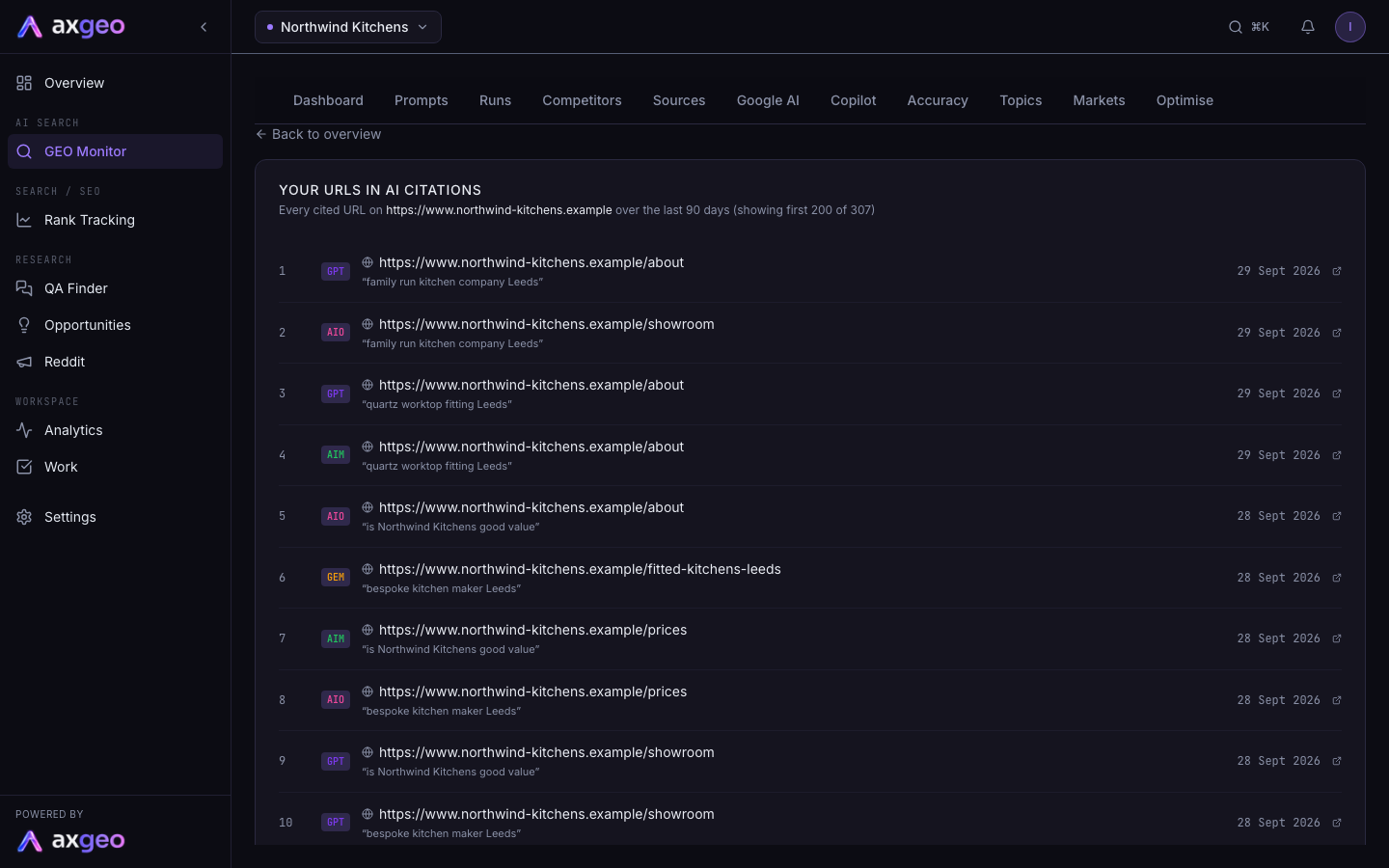
This page lists every time an AI answer cited a page on your own website in the last 90 days. The heading names the website it matched against. It shows up to 200 rows. If there are more, it says how many it is showing out of the total.
Each row shows:
- the engine that cited the page, as a short code
- the full web address of your page, which opens in a new tab
- the prompt that led to the citation, in quotation marks
- the date of the answer
Click the prompt to open the exact answer on the Runs tab, so you can read what the engine said around your link. If one answer cited three of your pages, it appears as three rows.
What the numbers tell you
A domain near the top of Top Citation Sources is one the engines trust for your subjects. If competitors or directories lead the list, being mentioned on those sites is often as useful as improving your own pages. The Sources tab groups the same kind of data by page and site type.
Your own cited pages show what is already working. Pages that appear often are good models for the rest of your site. Pages that never appear may need work, which you can track in Pages.
For how citation rate is worked out, see AI visibility metrics.
Common problems
No citations recorded yet
Your prompts haven't produced answers with sources yet. Wait for your prompts to run, then check again.
No client website configured
The URL page needs your website address to know which links are yours. Add it under Website URL in Settings, Workspace. See Workspace settings.
No citations of your URLs in this window
None of the answers in the last 90 days linked to your website. Use the Sources tab and the Topics tab to find where competitors are being cited instead.
I can't see the Your URL cited link
The Citation Rate card only shows the link once at least one of your URLs has been cited. Until then, it reads "URL cited by AI".