
In brief
The Sources tab in GEO Monitor shows what kind of pages and sites AI engines cite when they answer questions in your market, and lets you open the actual sources. Lower down, it shows which AI crawlers visit your own website and which pages they read.
Key points
- Citation sources come from ChatGPT and Perplexity answers over the last 90 days.
- Click a page type under What kind of page to see the actual sources behind it.
- A separate panel shows where the AI gets its information when it mentions you.
- Your own website is highlighted wherever it appears.
- AI crawler activity covers the last 30 days and needs your site's access logs.
- Download the cited domains as a CSV with the Cited domains CSV button.
The steps at a glance
- 1
Open the Sources tab
Go to GEO Monitor in the sidebar and choose the Sources tab.
- 2
Read the headline
The coloured box at the top tells you which type of page AI engines cite most in your market.
- 3
Open a page type
Under What kind of page, click a bar to see the actual sources for that type, with how many times each was cited and by which engine.
- 4
Check where your mentions come from
Read the panel that asks where the AI gets its information when it mentions you, to see which page and site types sit behind your mentions.
- 5
Check AI crawler activity
Scroll down to AI crawler activity to see which AI bots visit your site and which pages they read most.
- 6
Export the list
Press Cited domains CSV at the top right to download the cited domains from the last 30 days.
AI engines form their view of your market from the pages they read and cite. The Sources tab shows you what those pages are, so you can see which kinds of site you need to be on, and whether AI crawlers are reading your own website.
You'll find it in GEO Monitor, on the Sources tab.
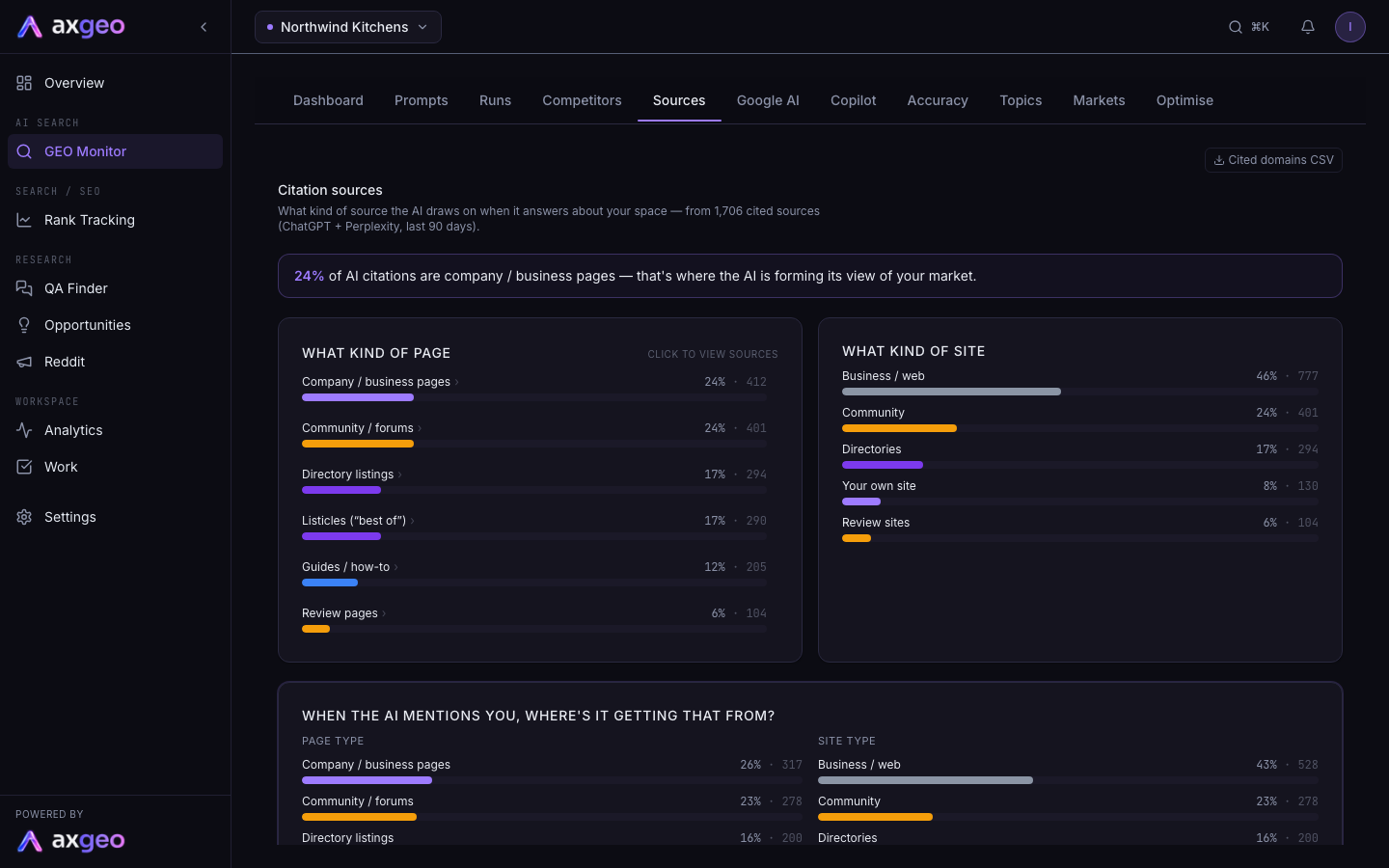
How to use the Sources tab
- Go to GEO Monitor in the sidebar and choose Sources.
- Read the coloured box at the top. It names the type of page that makes up the biggest share of AI citations in your market.
- Under What kind of page, click any bar. A panel opens listing the actual sources of that type, with the number of times each was cited and the engines that cited it. Click a source to open it in a new tab. Press Close to hide the panel.
- Read When the AI mentions you, where's it getting that from? to see which sources sit behind the answers that name you.
- Scroll down to AI crawler activity to see which AI bots visit your site.
- Press Cited domains CSV to download the cited domains as a spreadsheet.
What each part of the screen means
Citation sources
This section is built from the sources ChatGPT and Perplexity cited in their answers to your prompts over the last 90 days. The line under the heading tells you how many cited sources it is based on. Search engine links are removed, so you only see real pages.
What kind of page splits citations by page type, such as company pages, company homepages, listicles ("best of" lists), review pages, guides, comparisons, directory listings, social pages and community forums. Each bar shows the share of citations and the count.
What kind of site splits the same citations by the type of website. The groups are business sites, directories, review sites, social, community, news and your own site.
When the AI mentions you, where's it getting that from? only looks at answers that mention you. If it differs from the overall picture, it tells you which sources are already working in your favour.
Page type by engine shows the page type split for each engine on its own, so you can see where ChatGPT and Perplexity behave differently.
Most-cited sources lists up to 20 of the websites cited most often. Your own site is highlighted in the brand colour.
AI crawler activity
This section looks at the other side of AI visibility: the bots that read your website so AI engines can use it. It covers the last 30 days.
- Total AI-crawler requests is the number of visits from AI bots.
- Distinct AI crawlers is how many different bots visited.
- The Crawlers list shows each bot, its number of visits and the date it was last seen.
- Most-crawled pages lists the pages on your site the bots read most.
The crawler data comes from your website's access logs. Ordinary visitors are ignored, and only known AI bots are counted.
Using what you find
If listicles or review pages make up a big share of citations, getting your business onto those pages matters as much as your own website. Open the drill-down to see exactly which ones, then plan outreach or reviews around them.
If your own site rarely appears, look at Top citations and URL mentions to see which of your pages are cited. Use the Topics tab to find subjects where competitors are linked and you are not.
To read the full answer behind any citation, go to the Runs tab.
Listings of your business on directory sites are a different kind of citation. The Directory Citations section tracks those when it is switched on for your workspace. See Directory citations.
Common problems
No citation data yet
The tab fills once your prompts have run on ChatGPT and Perplexity. If you've just added prompts, wait for the first runs, then come back. See Add and manage prompts.
No crawler data yet
Crawler activity comes from a feed of your site's access logs, for example from your web server or Cloudflare Logpush. The axgeo.ai team sets this up with you and your web host. Email [email protected] to get it started.
A source looks like the wrong type
Sources are grouped automatically by their web address and content. A small number may land in the business group when they are really a directory or review site. The counts are still correct, only the label differs.
The numbers don't match the dashboard
The citation sources here cover ChatGPT and Perplexity over 90 days. The dashboard and the CSV use other windows and engines, so the totals will differ. For definitions of each metric, see AI visibility metrics.