
In brief
QA Finder shows the questions people really ask about a topic, taken from Google autocomplete, People Also Ask, Reddit and your own enquiries. Tick the useful ones to add them to your prompts or tasks, or generate an AI answer pack you can paste onto your site.
Key points
- Search one topic at a time, or up to 20 topics in one batch.
- Questions come from Google autocomplete and People Also Ask, and you can add Reddit and your own enquiries.
- Ticked questions can be added to your tracked prompts or to your Work list as content tasks.
- An AI answer pack gives you a quick answer, FAQs, a longer answer and schema code for one question.
- Every answer pack for a search is saved in that search's answers document.
- QA Finder is included on the Agency plan.
The steps at a glance
- 1
Open QA Finder
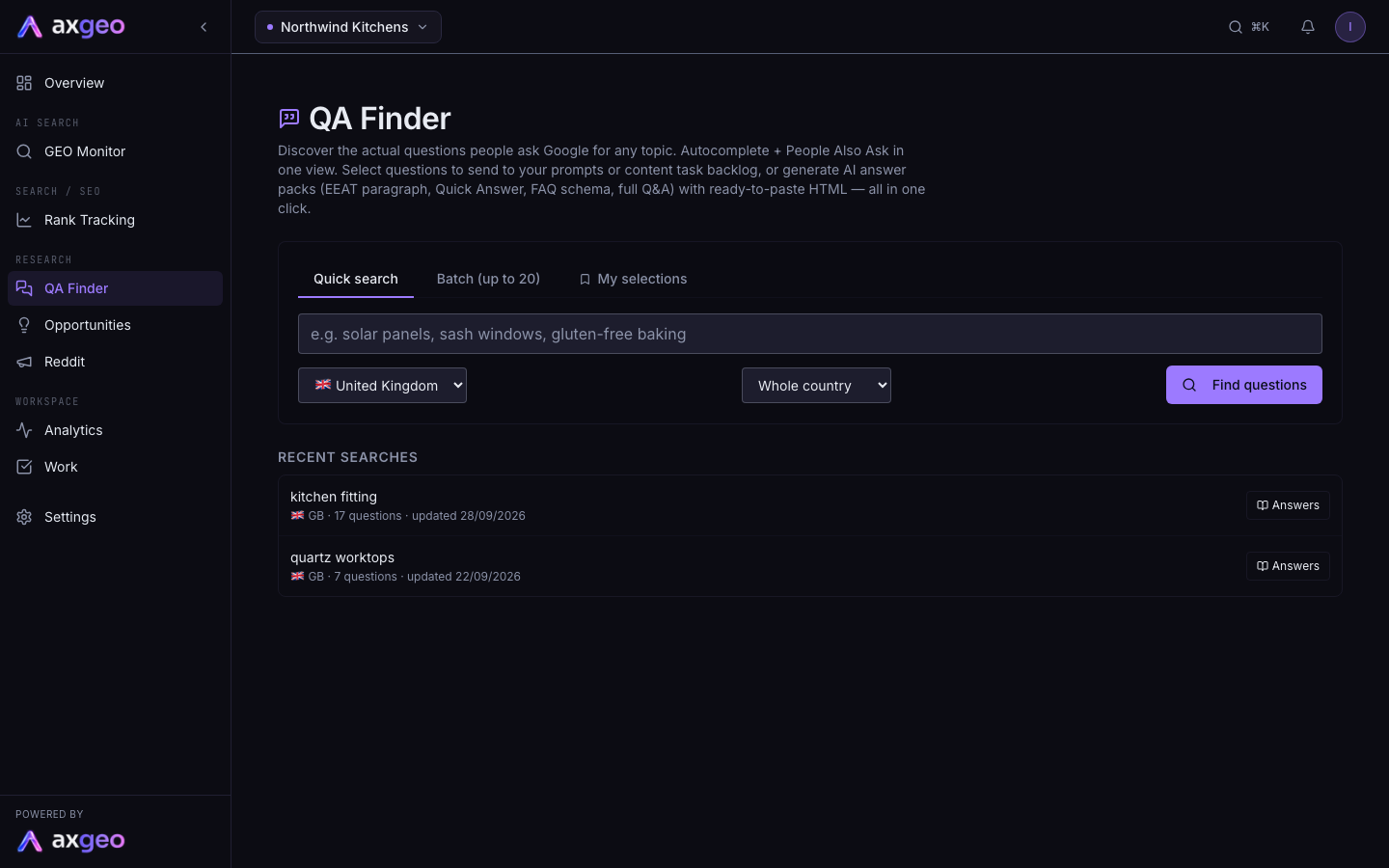
Choose QA Finder from the Research group in your sidebar.
- 2
Enter a topic
Type a topic such as kitchen worktops on the Quick search tab. For several topics, use Batch (up to 20) and put one topic on each line.
- 3
Pick the market
Choose the country. If a region list appears, pick a region or leave it on Whole country.
- 4
Find questions
Press Find questions. The results show People Also Ask questions and autocomplete questions for each topic.
- 5
Add more sources
Press Reddit under More questions from, or press Your enquiries or calls and paste in customer messages, then press Find the questions.
- 6
Use the questions
Tick the questions you want, then press Add to prompts or Add to tasks in the bar at the bottom of the page.
QA Finder shows you the questions people actually type into Google about a topic. It also reads Reddit threads and your own customer enquiries. You can turn the best questions into tracked prompts, add them to your Work list as content tasks, or generate a full answer for your website in one click.
QA Finder is included on the Agency plan. If you don't see it in your sidebar under Research, it isn't part of your plan. See plans and credits for what each plan includes.
How to run a search
- Choose QA Finder from the Research group in your sidebar.
- Type a topic on the Quick search tab, for example kitchen worktops. To search several topics at once, open Batch (up to 20) and put one topic on each line.
- Pick the country. If your country has regions, a second list appears. Pick a region to localise the questions and answers, or leave it on Whole country.
- Press Find questions.
Each topic gets its own results card. The line under the topic shows the country, how many autocomplete and People Also Ask (PAA) questions were found, and when the search was last updated.
You can also arrive here from the Opportunities page. The topic box is filled in for you.
Getting more questions
Under More questions from, there are two extra sources.
- Press Reddit to add questions from Reddit threads. These include threads the AI engines cite for you and Reddit threads Google shows for the topic.
- Press Your enquiries or calls to paste in enquiry form messages, customer emails or call notes. Press Find the questions and QA Finder pulls out what your customers asked, most asked first. The button works once you have pasted at least 40 characters.
Under the People Also Ask list, press Find more questions to dig one level deeper into Google's related questions. When nothing new is left, the message says so.
Sending questions to prompts or tasks
Tick the box next to any question. A bar appears at the bottom of the page showing how many you have selected.
- Add to prompts adds them as tracked prompts, so the AI engines are asked these questions on your normal schedule. If you go over your plan's prompt limit, the extra questions wait in a pending queue until you free a slot. See prompts.
- Add to tasks adds each question to your Work list as a content brief.
- Clear removes your ticks.
Questions you have used show a small in prompts or in tasks label, with a tick. The My selections tab lists every question you have sent on, with filters for All, In prompts and In tasks, plus links to Go to prompts and Go to tasks.
To get rid of a question you don't want, press Hide. It won't come back in future searches.
AI answer packs
Under any question, press AI answer pack, then Generate AI answer pack. You get a set of ready-made content for that one question, shown in tabs.
- Quick Answer is a short answer written for AI Overviews and featured snippets.
- Key Takeaways gives five short bullet points.
- EEAT is an opening paragraph about your experience, with placeholders to fill in.
- FAQ is a block of six questions and answers with FAQPage schema.
- Q&A is a longer answer for a page section.
- Author is a short author bio with Person schema.
Each tab has Show code for the HTML and a copy button. Copy Article schema gives you one block of code for the page's head. Replace any [placeholders] with your real details before you publish. For more on schema code, see schema.
On the Agency plan, answer packs are covered by your plan.
The answers document
Press Answers on a results card, or next to a recent search, to open that search's answers document. It lists every answer pack you have generated for the search, with a contents list at the top. Each answer shows the quick answer, the longer answer, the FAQs and key takeaways. Questions without a pack yet are listed at the bottom under No answer pack yet. Press View answer under a question to jump straight to its answer.
Other buttons on a results card
- CSV downloads the questions as a spreadsheet file.
- Refresh runs the original search again. It is greyed out until the next refresh date, which shows when you hover over it.
When you have no results on screen, Recent searches lists your past searches. Click one to open it again.
Common problems
Find questions is greyed out
You have reached this month's search limit. The badge at the top of the page shows your usage, and searching resumes on the 1st of the next month.
No questions found
The message No questions found means Google had little for that wording. Try a more specific topic, or a phrase your customers would use.
Reddit adds nothing
The Reddit button only finds questions where there are relevant threads. If it says No new questions found, try your enquiries instead. The Reddit page shows which communities the AI engines cite for you.