
In brief
The Reddit page lists the Reddit communities AI engines cite when they answer your tracked prompts. It also shows other discussion sites and the business sources they point to. Press Discover communities after new runs, then star the communities worth your time.
Key points
- Communities are found in the citations from your existing AI prompt runs.
- Discover communities re-scans your runs and does not use credits.
- Citations is how many times a subreddit appeared in cited links.
- Score compares each community with your most cited one.
- Star communities to shortlist them, and hide the ones that are not a fit.
- Reddit is included on Practice Plus, Group, Growth, Professional and Agency.
The steps at a glance
- 1
Open Reddit
Choose Reddit from the Research group in your sidebar.
- 2
Scan your runs
Press Discover communities. A message tells you how many communities were found and how many are new.
- 3
Sort the list
Use Sort by to order the table by Score, Citations or A-Z.
- 4
Shortlist
Press the star on communities worth taking part in, and the hide button on ones that are not a fit.
- 5
Check other sources
Scroll down to Other community platforms and Top cited business sources to see the rest of the sites AI engines cite.
The Reddit page shows the Reddit communities that AI engines cite when they answer questions about your business. It is built from the citations in your existing AI prompt runs, so it reflects what the engines actually point to. Use it to see where conversations about your type of business happen, and which communities are worth joining.
Reddit is included on Practice Plus, Group, Growth, Professional and Agency. If you don't see Reddit in your sidebar under Research, it isn't part of your plan.
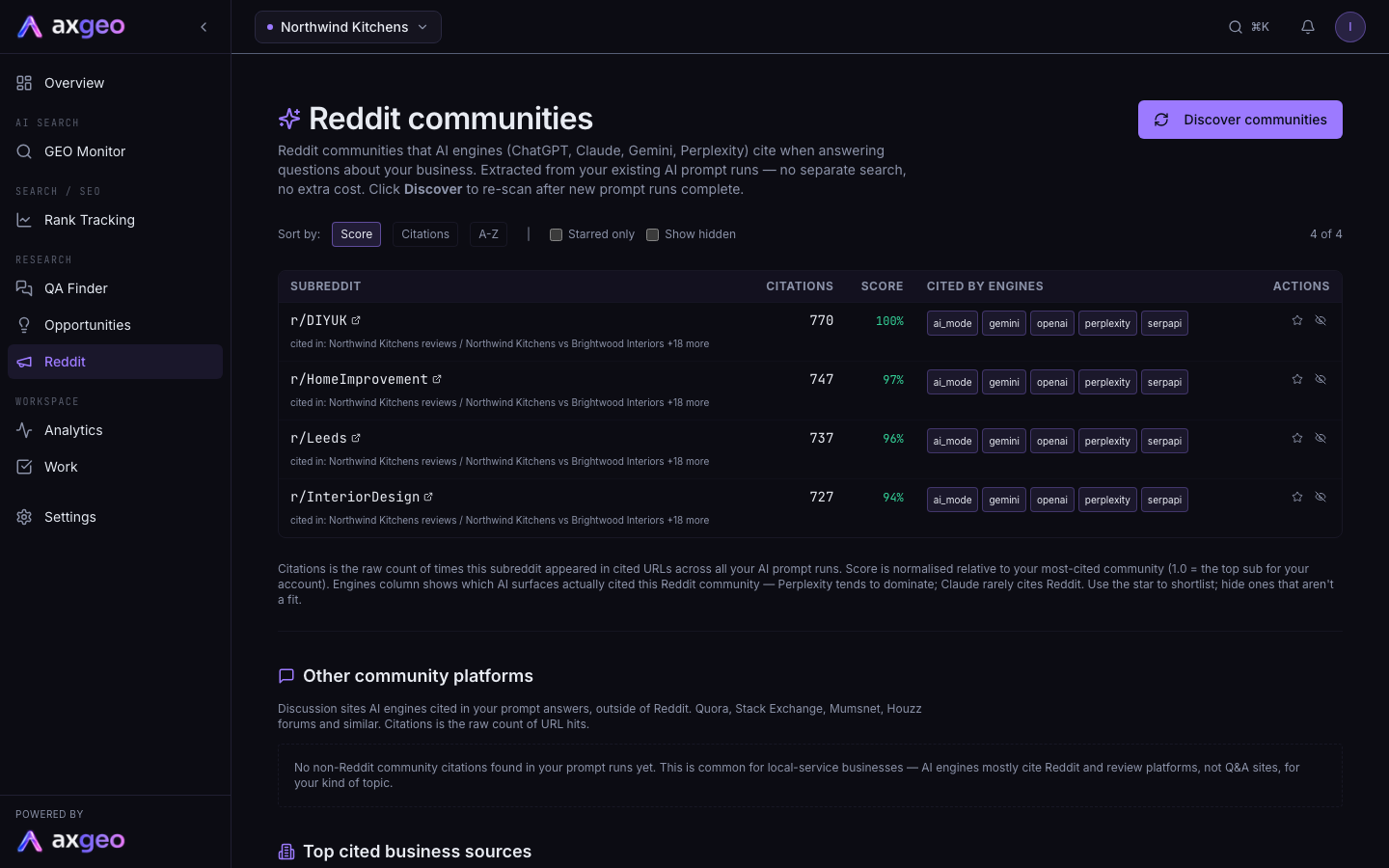
How to find your communities
- Choose Reddit from the Research group in your sidebar.
- Press Discover communities. axgeo.ai scans the citations from your AI runs and pulls out every subreddit.
- Read the message. It tells you how many communities were found, from how many citations, and how many are new or refreshed.
Press Discover communities again after new prompt runs finish, so the list stays up to date. It does not use credits, because it reads data you already have. The runs come from the prompts you track, so a wider set of prompts gives a fuller picture.
What the communities table shows
Each row is one subreddit. Click its name to open it on Reddit.
- Citations is how many times links from that subreddit appeared in cited URLs across all your AI prompt runs.
- Score compares the community with your most cited one. Your top community is 100%, and the rest are shown as a share of it.
- Cited by engines shows which AI engines cited that community.
- The small "cited in" line under the name shows a couple of the prompts where it came up.
- An NSFW label marks communities flagged as adult content.
Sorting and shortlisting
Use Sort by to order the list by Score, Citations or A-Z.
Press the star in the Actions column to mark a community as interesting. Tick Starred only to see just your shortlist. Press the hide button to move a community out of the way. Tick Show hidden to bring hidden ones back into view, and press the button again to unhide one. The count on the right shows how many communities are on screen out of the total.
Other community platforms
Below the Reddit list, Other community platforms shows discussion sites outside Reddit that AI engines cited in your prompt answers, such as Quora or Stack Exchange. The columns are the same idea as above.
- Domain is the site. Use the arrow to see its top cited pages.
- Citations is the raw count of cited links.
- Prompts is how many of your prompts it was cited for.
- Engines shows which AI engines cited it.
Top cited business sources
Top cited business sources lists the review platforms, trade bodies, social media, competitor websites and your own site that AI engines pointed to when answering your prompts. Use the chips above the table to show or hide a type, such as Review platforms or Competitors. Double-click a chip to show only that type, or press Show all to reset. You can sort by Most cited, By type or Alphabetical.
Use it to spot review sites worth building a profile on, and the competitor sites the engines treat as trusted for your topic. For a fuller view of every cited domain, see sources and AI crawlers and cited pages.
Common problems
The list is empty
The message No Reddit citations found in your AI runs yet means one of two things. Your prompt runs may not have finished, or the engines are not citing Reddit for your topics. Reddit features less for many local service businesses. Check your runs, then press Discover communities again later.
I want the questions people ask on Reddit
To pull real buyer questions from Reddit threads, use the Reddit button in QA Finder, on plans that include it.