
In brief
Every axgeo.ai plan comes with a set of allowances, such as questions checked each week, AI engines and Google keywords. Work inside those allowances is paid for by your monthly price. A few extras use credits, which you can top up from Settings, Billing.
Key points
- Each plan has a monthly price plus VAT, with no contract and no setup fee.
- Work covered by your plan, such as AI answer checks and rank tracking, uses no credits.
- A small number of extras, such as prompt demand figures and prompt suggestions, use credits.
- Credit packs are available once your workspace has an active plan.
- Bought credits roll over. Monthly plan credits, where a plan has them, do not.
- Your credit balance is on Settings, Billing.
The steps at a glance
- 1
Open Billing
Go to Settings in your sidebar and choose the Billing tab.
- 2
Check your plan
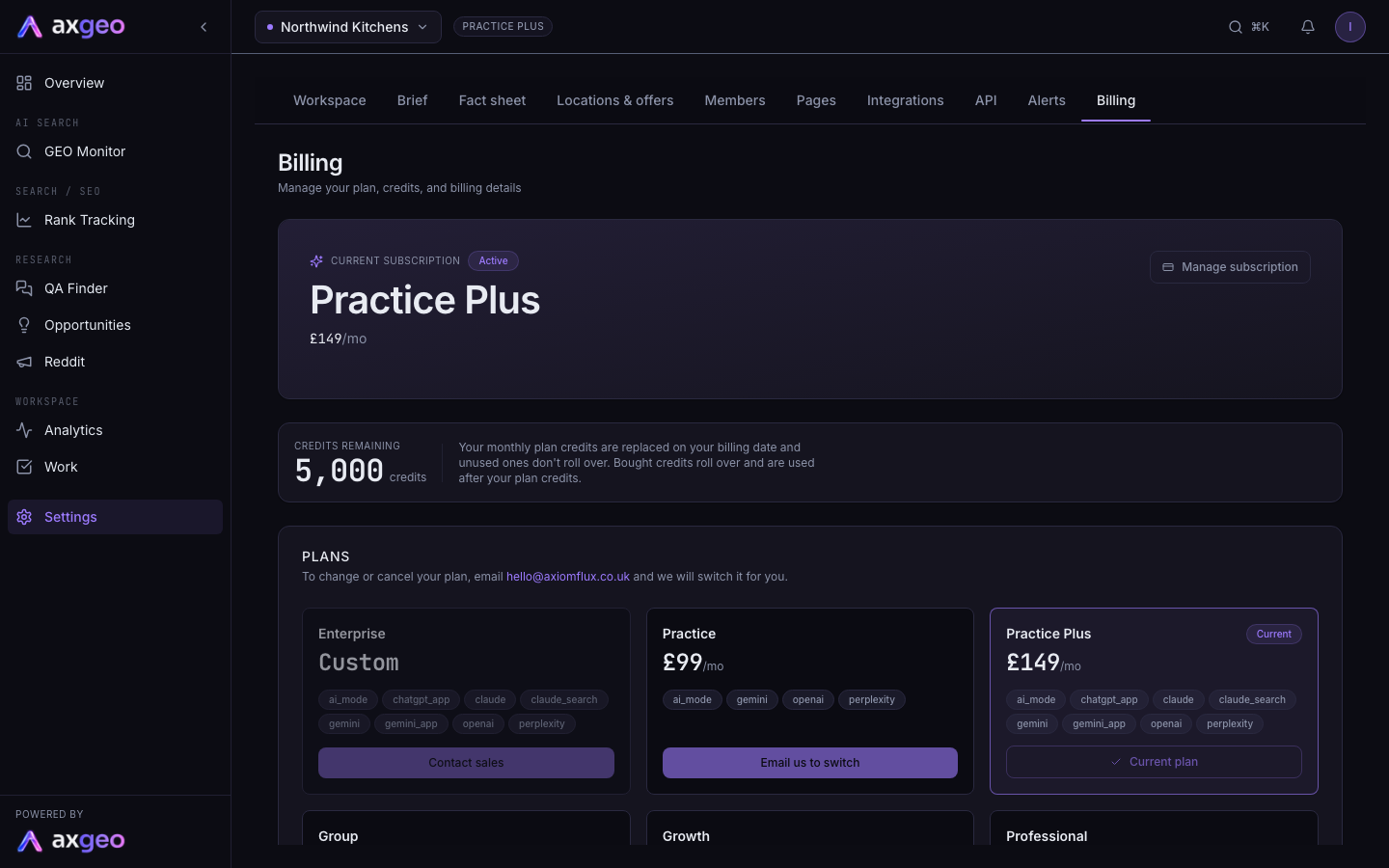
Read the Current subscription card for your plan name, monthly price and status.
- 3
Check your balance
Look at Credits remaining to see how many credits your workspace has right now.
- 4
Top up if you need to
Pick a pack in Top up credits and press Buy. You finish payment on a secure Stripe checkout page.
- 5
Review your usage
Scroll to Transaction history, which lists each time credits were added or used, with the balance after each one.
Your plan decides which tools appear in your workspace and how much work runs each week. Most of that work is paid for by the monthly price, and a short list of extras uses credits.
How to check your plan and credits
- Open Settings in your sidebar and choose the Billing tab.
- Read the Current subscription card for your plan, its monthly price and whether it is Active.
- Check Credits remaining for your balance.
- Use Top up credits further down the page if you need more, and press Buy on a pack.
For more on the Billing tab, invoices and billing details, see Billing.
What each plan includes
All plans are monthly, priced plus VAT, with no contract.
| Plan | Price a month | Questions each week | Google keywords tracked | Users |
|---|---|---|---|---|
| Practice | £99 | 20 | 10, in 1 location | 3 |
| Practice Plus | £149 | 30 | 25, in 1 location | 5 |
| Group | £399 (5 sites) | 100 | 10 in each of 5 locations | 10 |
| Growth | £500 | 100 | 30 in each of up to 3 locations | 8 |
| Professional | £799 | 175 | 30 in each of up to 5 locations | 10 |
| Agency | £1,499 | 350 | 100 in each of up to 3 locations | 15 |
Questions each week are the prompts you can have active at once on the Prompts tab. Each location is one rank tracking campaign.
Extra Group sites are £69 each a month plus VAT. Each one adds 20 questions, one more rank tracking location and 2 users.
AI engines
Every plan checks your questions each week on ChatGPT with search, Gemini, Perplexity and Google AI Mode. Practice Plus and Group also check Claude, Claude with search, the ChatGPT app and the Gemini app once a month. Growth, Professional and Agency check all eight engines every week. See Prompts for how questions and engines are set up.
Reviews, pages and drafts
Google reviews are tracked for 1 location on Practice and Practice Plus, 5 on Group, 3 on Growth, 5 on Professional and 10 on Agency. Each plan also includes a number of pages analysed and content drafts each month, from 10 pages and 2 drafts on Practice up to 1,000 pages and 100 drafts on Agency.
Tools in your sidebar
Every plan includes GEO Monitor, Rank Tracking, Pages, Content, Google Business, Reports and Work, plus Overview, Opportunities and Settings. Answer accuracy checks, your fact sheet, competitor share of voice, the sources AI cites, schema checks and PDF reports are on every plan.
- Practice Plus and Group add the four monthly engines and the Reddit page, which shows the Reddit communities AI cites.
- Growth, Professional and Agency add topic gaps, the Reddit page, and the Integrations and API tabs in Settings for SEMrush and the data API.
- Agency also includes QA Finder, with AI answer packs, and covers up to 10 sites.
If a tool isn't in your sidebar, it isn't part of your plan. Link Building, Directory Citations and Analytics appear when they are switched on for your workspace.
Allowances and credits
An allowance is work your plan pays for, such as your weekly questions or tracked keywords. On the current plans, this work uses no credits. That covers:
- AI answer checks on the engines in your plan.
- Rank tracking and Google Business syncs and review pulls.
- Page checks, content drafts and drafted review replies.
- Topic gaps, the Reddit page and QA Finder answer packs, where your plan includes them.
Credits are a balance that pays for extras. On the current plans these use credits:
- Prompt demand figures and prompt suggestions on the Prompts tab.
- The competitor check on Answer accuracy.
- Analyse on an item in Opportunities.
- Analyse competitors on the Competitors tab.
- Link gap checks, and automatic pulls from review platforms other than Google.
- Any AI engine or feature that is outside your plan.
Workspaces on older credit-based plans work differently. They pay credits for each action, including AI answer checks, and get a monthly credit allowance shown on the Billing tab.
Top-ups and how credits are used
Top-up credit packs are only available once your workspace has an active plan. Without one, the Billing tab says top-ups are available once a plan is active.
Bought credits roll over from month to month. Where a plan includes monthly credits, those are replaced on your billing date and unused ones do not carry over. Your plan credits are used first, then your bought credits.
The Transaction history table on the Billing tab shows each change to your balance. The tag on each row tells you what it was, for example used, bought, monthly allowance or plan credits expired.
Common problems
An action says it isn't available
If an action needs credits and your balance is too low, it stops. You may see a message that the feature is temporarily unavailable for your workspace, or that you are out of credits. When the balance reaches zero, the Billing tab shows "Out of credits. Buy a credit pack or change plan to keep running prompts and analyses." On the current plans a zero balance is normal, because the work your plan covers doesn't draw on credits.
I can't see Top up credits
The section only appears when your workspace has an active plan. If your subscription has lapsed, see Billing for how to get it running again.
A tool from another plan is missing
Your sidebar only shows the tools your plan includes. To move to a plan that has the tool you need, email us at [email protected]. For a tour of where everything lives, see Getting started.
I want to change or cancel my plan
Email us at [email protected] and we will make the change. There is no contract. Billing covers invoices and payment details.