
In brief
The Competitors tab shows how your business stacks up against rivals in AI answers. It covers your share of voice, how early you are named, how often you are recommended, which untracked brands the AI suggests, and a URL Analyser for any competitor page.
Key points
- Share of voice is your share of all brand mentions in your AI answers.
- Position-weighted share of voice counts a brand named first more than one named last.
- Prominence is a 0 to 100 score for how strongly you show up when you are named.
- Intelligence shows who the AI actually recommends, and why, including brands you don't track.
- Analysing competitors uses credits.
- The URL Analyser pulls the title, headings and word count from any page.
The steps at a glance
- 1
Open the Competitors tab
Go to GEO Monitor and click Competitors.
- 2
Check the ranking
Overview lists each brand with its share of voice and rank.
- 3
Look at share of voice in detail
Open Share of Voice and switch between Position-weighted and Raw mentions.
- 4
See who the AI recommends
Open Intelligence and click Analyse competitors, or Analyse more if you have analysed before.
- 5
Study a competitor page
Open URL Analyser, paste a page address and click Analyse.
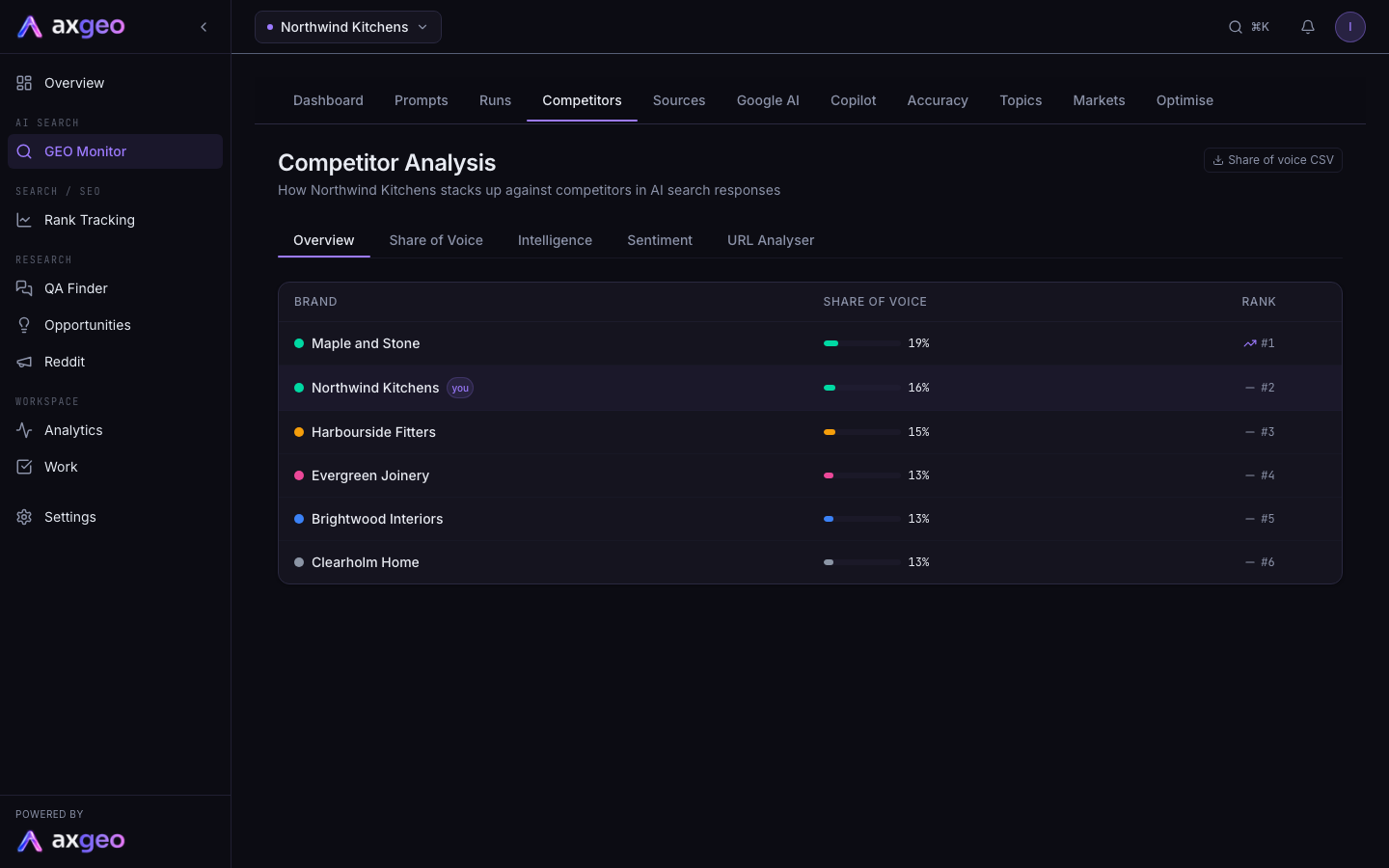
The Competitors tab, headed Competitor Analysis, shows how your business compares with rivals in AI search answers. It answers three questions. How often are we named against them? How early and how warmly are we named? And who does the AI actually recommend?
How to use the Competitors tab
- Go to GEO Monitor and click the Competitors tab.
- Start on Overview for a quick ranking of brands.
- Open Share of Voice to see position weighting, your prominence and the split by engine.
- Open Intelligence and click Analyse competitors to see who the AI recommends and why.
- Use Sentiment to check the tone of answers about you.
- Use URL Analyser to look at how a competitor's page is built.
Share of voice CSV, at the top right, downloads your share of voice for the last 30 days.
The five views
Overview
A table of brands with their share of voice and their rank, with your business marked "you". It uses the same raw share of voice as the Dashboard.
Share of Voice
The toggle at the top switches between two ways of counting.
- Position-weighted gives each brand points by where it lands in each answer. First named gets 1 point, second gets half a point, third a third, and so on. A brand named first counts for more than one buried at the bottom.
- Raw mentions counts each AI answer that names a brand once, wherever the name appears.
Next to the toggle you may see two headline figures for your business.
- Average position in answers is where you are usually named among the brands in an answer. 1 means named first.
- Prominence is a score out of 100 with a band, such as 72 Visible. It shows how strongly you show up when you are named.
Below them are four cards.
- The share of voice card lists each brand's share. In the weighted view it also shows each brand's average position and how many mentions the figure is based on.
- Share of voice over time shows each brand's share day by day.
- Share of voice by engine splits it for ChatGPT, Gemini, Perplexity and the rest. You can lead on one engine and be missing on another, so this shows where to focus.
- Prominence breakdown shows the parts of your prominence score. Named early is how early you appear, Recommended is how often you are recommended rather than just listed, Cited is your citation rate and Positive tone is the share of positive answers.
The bands are Featured for 80 and above, Visible for 60 and above, Present for 40 and above and Buried below that. Any part with no data yet is left out rather than counted as zero. For more on each figure, see AI visibility metrics explained.
Intelligence
Intelligence reads your recent answers and records every brand named, whether it was recommended or only mentioned, and the reasons the answer gave. Click Analyse competitors the first time, then Analyse more to cover newer answers. It takes about 45 seconds and uses credits. Only answers not analysed before are read.
- Competitors the AI recommends that you're not tracking lists brands marked "new", with the reasons given and how many times each was recommended.
- Share of recommendation shows each brand's share of all recommendations. A high figure means the AI actively suggests that brand as a good choice.
- Recommendation share by engine shows the same split for each engine.
The line under the heading shows how many answers have been analysed and how many are still waiting.
Sentiment
The tone of the answers about your business, as Positive, Neutral and Negative shares. To read the negative answers themselves, click the Negative row on the Dashboard's Sentiment Distribution card.
URL Analyser
Paste any page address, for example a competitor page an engine keeps citing, and click Analyse. You get the page title, meta description, the number of H1, H2 and H3 headings, the word count and the full heading structure, with copy buttons for each. You can also open a cited link here from the Runs tab by clicking Analyse next to it.
Making use of what you find
- Look at the reasons in Intelligence. If the AI recommends a rival for "evening appointments" or "10-year guarantee", and you offer that too, make sure your site and fact sheet say so clearly.
- Check Share of voice by engine to pick the engine where you are furthest behind.
- Use the URL Analyser on the pages that win, then compare their structure with your own.
- The Optimise tab turns gaps like these into suggested fixes.
Common problems
No competitor data yet
The Overview, Share of Voice and Sentiment views fill in once your prompts have been run. Intelligence and URL Analyser work at any time.
A brand I compete with isn't in the list
Share of voice counts the competitors tracked on your prompts and shows the top six. Run Intelligence to see whether the AI recommends that brand. If it does, it appears in the list of brands you're not tracking.
Analyse competitors shows an error
Analysing uses credits. Check your balance on Billing.
My prominence score isn't showing
It appears once at least one answer names you. If none of your current answers name you, there is nothing to score yet.