
In brief
Prompt gaps lists the questions from your prompt set where AI engines named a competitor but not you. Each gap shows which engines missed you, who they named instead and which sites they cited. You can then send it to your Work board.
Key points
- A gap is a prompt where at least one engine named a competitor and not you.
- Gaps are taken from the latest answer each engine gave in the period you pick.
- Each gap gets a High, Medium or Low priority.
- Send to Work creates a Content task for the gap.
- Prompt gaps reads answers you already have, so it uses no credits.
The steps at a glance
- 1
Open Prompt gaps
Go to Content in the sidebar and click the Prompt gaps tab.
- 2
Pick a period
Choose Last 14 days, Last 30 days or Last 90 days.
- 3
Start with High
Click the High filter to see the prompts where you are missing most.
- 4
Read who was named
Check Named instead and Cited to see which competitors and sites the engines used.
- 5
Send it to Work
Click Send to Work to create a task, then plan the page or mention that would get you named.
Prompt gaps shows the questions in your prompt set where AI engines recommend a competitor but leave you out. These are often the quickest wins in AI search, because the engines are already answering the question. They just aren't naming you. Open Content in the sidebar and click the Prompt gaps tab.
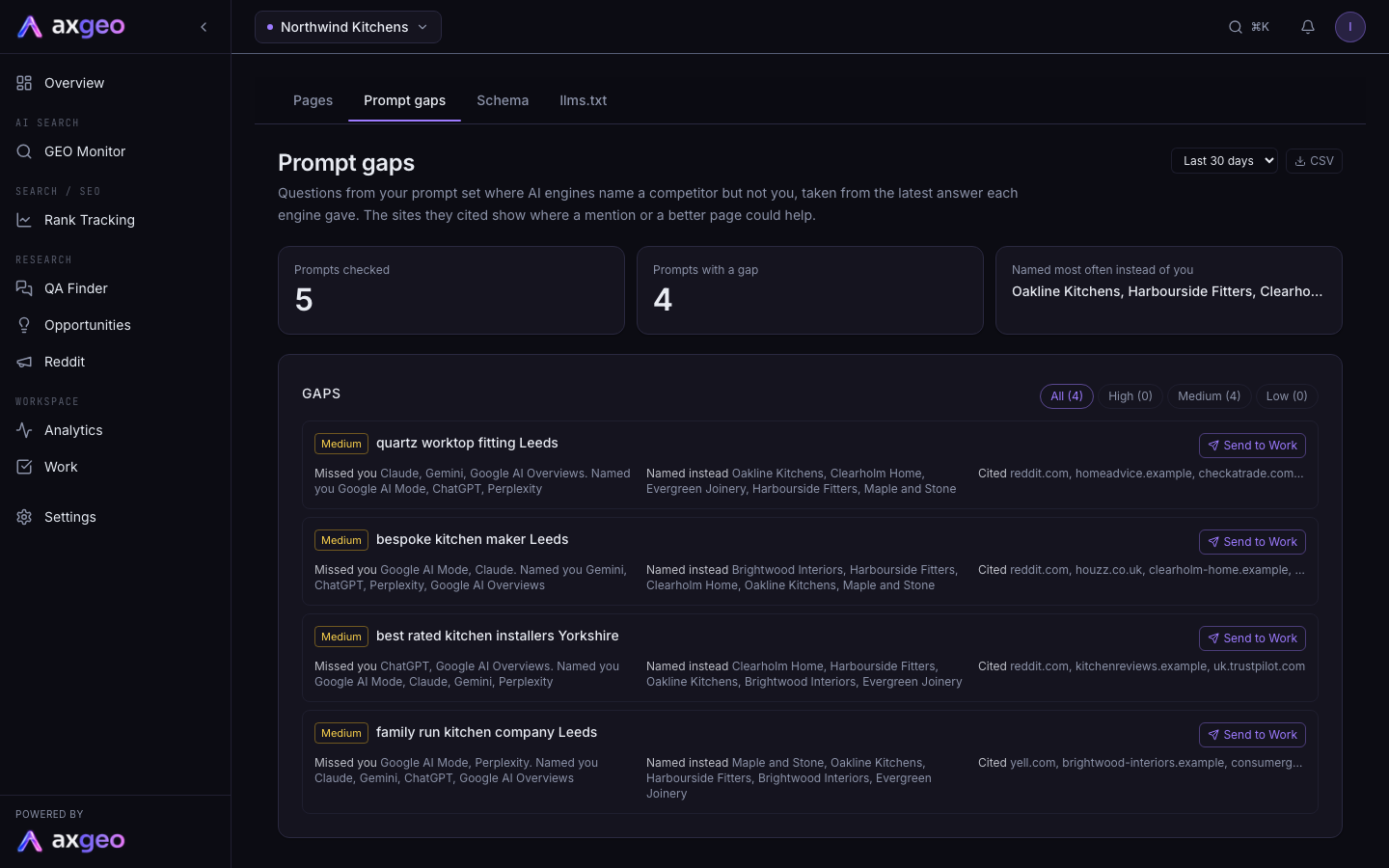
How to use Prompt gaps
- Choose a period from the menu at the top right. The options are Last 14 days, Last 30 days and Last 90 days.
- Click High to see the biggest gaps first.
- Read which engines missed you on each gap, who they named instead and which sites they cited.
- Click Send to Work to create a task. The button changes to In Work once it's sent.
- Plan the fix. That might be a new or better page on your site, or getting mentioned on one of the cited sites.
Click CSV to download the gaps for the period you've chosen.
What the screen shows
Summary cards
Prompts checked is how many of your prompts had answers in the period. Prompts with a gap is how many had at least one engine name a competitor but not you. Named most often instead of you lists the competitors that appear most across your gaps.
Priority
Each gap gets a priority, based on how many engines missed you.
High means no engine named you and at least two named a competitor.
Medium means two or more engines missed you while another named you, or one engine missed you and none named you.
Low means one engine missed you while at least one other named you.
Use the All, High, Medium and Low buttons to filter the list. Each shows its count.
Each gap
Missed you lists the engines that named a competitor and not you. If some engines did name you, they're listed after "Named you". Named instead shows the competitors those engines recommended. Cited shows the websites those answers linked to, which tells you where the engines found their information.
The cited sites are useful clues. If a directory or review site keeps appearing, getting listed there may help. If competitors' own pages are cited, look at what those pages cover that yours don't.
Where the data comes from
Gaps use the latest answer from each engine for each active prompt in your chosen period. They use your main prompt runs. The extra runs for individual markets are left out. The Markets article covers those. Answers come from the engines your plan includes, so add or adjust prompts on the Prompts tab to change what is checked.
Prompt gaps reads answers you already have, so it uses no credits.
Sending a gap to Work
Send to Work creates a task called "Get named for:" followed by the prompt, in the Content workstream. The notes name the competitors, the engines that missed you and the pages they cited. The task also comes with a short checklist, from reading the answers to checking the prompt again after later runs. High priority gaps get a higher impact score on the board. You'll find the task on your Work board.
Common problems
The list is empty
If you see "No prompt answers in this period yet. Run your prompts first.", there are no answers in the period. Try a longer period, or wait for your next scheduled run. If you see "No gaps in this period.", the engines named you wherever they named a competitor.
A competitor I don't recognise is listed
The engines sometimes name businesses you don't think of as rivals. Check the Competitors tab to see how often each one appears across all your answers.
A gap is still showing after I fixed the page
Gaps follow the engines' latest answers. Engines can take weeks to pick up new content, so check again after a few more runs.